Merging vs rebasing
Properties
The first thing to understand about git rebase is that it solves the same problem as git merge. Both of these commands are designed to integrate changes from one branch into another branch—they just do it in very different ways.
# Merge
The easiest option is to merge the main branch into the feature branch using something like the following:
| |
Or, you can condense this to a one-liner:
| |
This creates a new “merge commit” in the feature branch that ties together the histories of both branches, giving you a branch structure that looks like this:
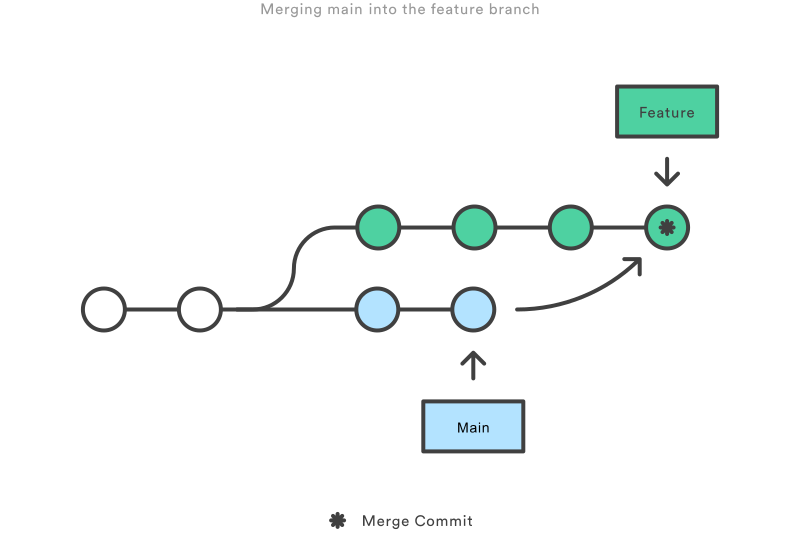
Merging is nice because it’s a non-destructive operation (Merging Is Non-Destructive). The existing branches are not changed in any way. This avoids all of the potential pitfalls of rebasing (discussed below).
==On the other hand, this also means that the feature branch will have an extraneous merge commit every time you need to incorporate upstream changes. If main is very active, this can pollute your feature branch’s history quite a bit.== While it’s possible to mitigate this issue with advanced git log options, it can make it hard for other developers to understand the history of the project.
# Rebase
As an alternative to merging, you can rebase the feature branch onto main branch using the following commands:
| |
This moves the entire feature branch to begin on the tip of the main branch, effectively incorporating all of the new commits in main. But, instead of using a merge commit, rebasing re-writes the project history by creating brand new commits for each commit in the original branch.
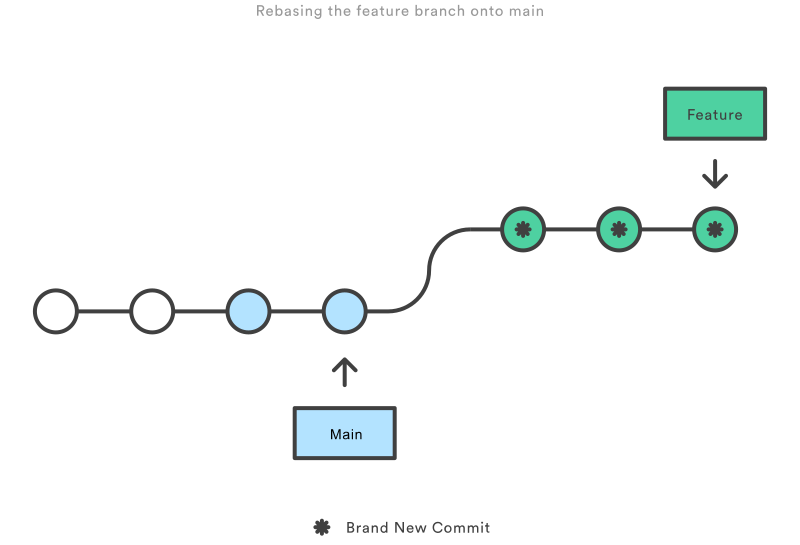
The major benefit of rebasing is that you get a much cleaner project history (Cleaner History With Rebase). First, it eliminates the unnecessary merge commits required by git merge. Second, as you can see in the above diagram, rebasing also results in a perfectly linear project history—you can follow the tip of feature all the way to the beginning of the project without any forks. This makes it easier to navigate your project with commands like git log, git bisect, and gitk.
But, there are two trade-offs for this pristine commit history: safety and traceability. If you don’t follow the Golden Rule of Rebasing, ==re-writing project history can be potentially catastrophic for your collaboration workflow==. And, less importantly, rebasing loses the context provided by a merge commit—you can’t see when upstream changes were incorporated into the feature.
# Golden Rule of Rebasing
==Once you understand what rebasing is, the most important thing to learn is when not to do it. The golden rule of git rebase is to never use it on public branches (Never Rebase On Public Branch).==
For example, think about what would happen if you rebased main onto your feature branch:
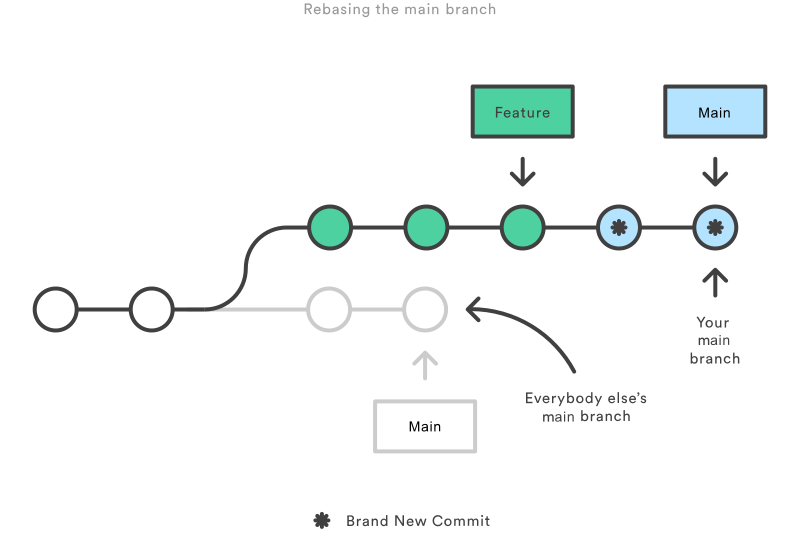
The rebase moves all of the commits in main onto the tip of feature. The problem is that this only happened in your repository. All of the other developers are still working with the original main. Since rebasing results in brand new commits, Git will think that your main branch’s history has diverged from everybody else’s.