Graphkasten
Properties
Graphkasten is an AI-native evolution of the Zettelkasten, designed for graph-centric note taking. It is built primarily around Obsidian and its tooling, but nothing about it is Obsidian-specific: any software or agentic system that can read a folder of Markdown can run it.
There is a working example at github.com/jakub-zovi/graphkasten, an Obsidian vault with real notes that implements everything described below. Clone it and open it in Obsidian to see the folder layout, the links, the tags and the graph in one piece.
Most people treat Graph View as a nice little gimmick. In Graphkasten it is the primary way you move around the vault: you navigate the global graph rather than a folder tree, steering toward a cluster instead of recalling where a note was filed (Fig. 1). Because every node takes its colour from its tag, the clusters are your topics of interest, readable at a glance and without opening anything. A local graph then gives you instant context around any single note. The premise is that the connections between notes matter as much as the notes themselves, and often more. That premise is also what makes the system safe to point an AI at: agents can index aggressively, because the graph turns their work into something a human can supervise at a glance.
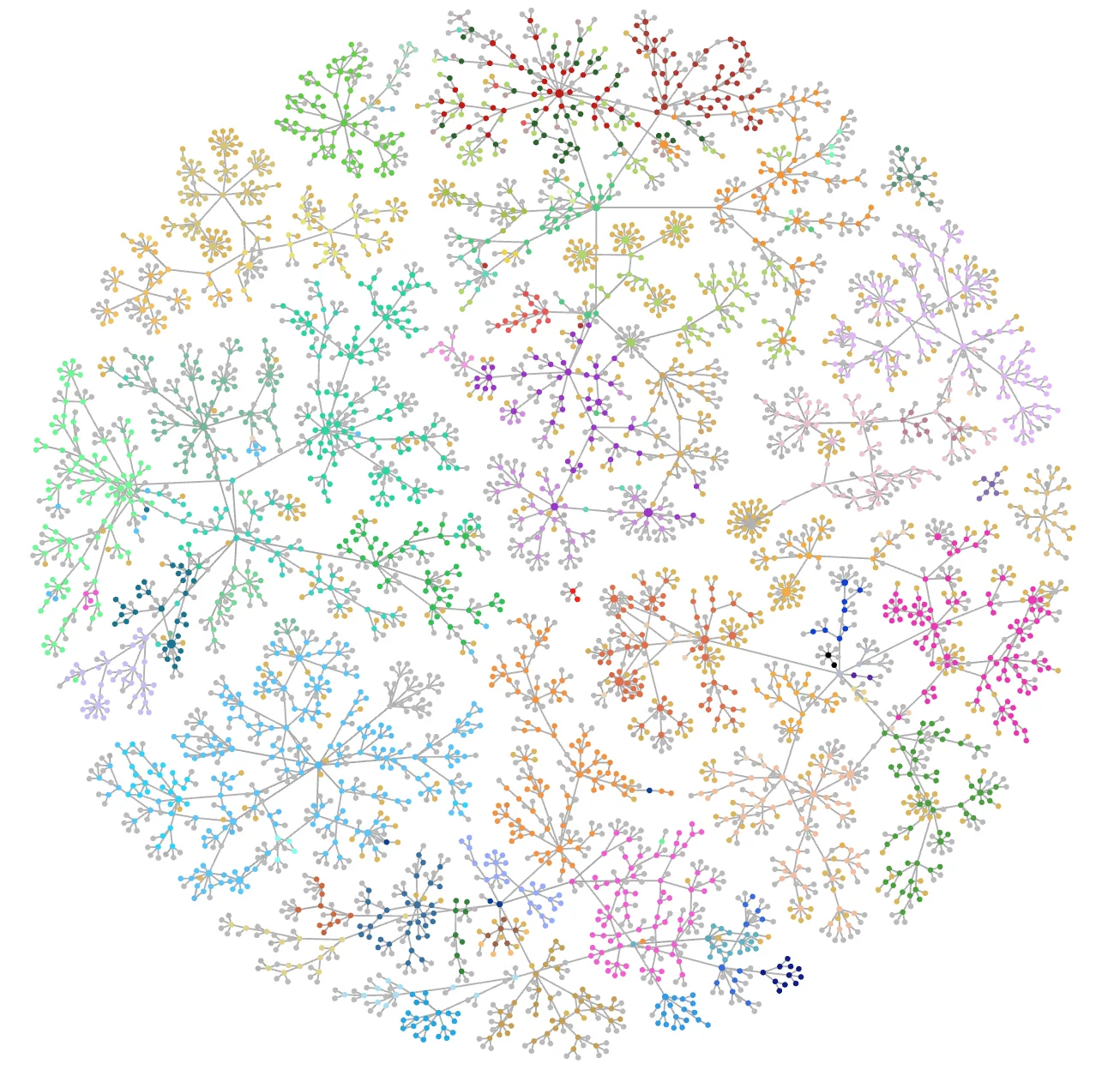
topics/, and its colour comes from its tag, so each coloured cluster is a topic of interest rather than something arranged by hand.# Latent space engineering
Four systems get cited whenever someone sets out to build a second brain:
- Zettelkasten by Niklas Luhmann, the ancestor of all of them: take notes of atomic ideas, index them, and cross-link them.
- PARA and CODE by Tiago Forte, which arrive as a pair. PARA defines a folder structure based on how actionable a note is, while CODE specifies how information gets processed.
- LLM Wiki by Andrej Karpathy, the newest of the four and the most direct about AI: let an LLM build the personal wiki.
- Open Knowledge Format by Google, which comes at the same material from the data-sharing side.
The first two are not designed for heavy AI use. The other two are broad, and aimed more at AI than at humans. The specifications of all four are too abstract and generic to follow mechanically. None of them leverages Obsidian’s features, because none was designed for it. They are missing a process for keeping a vault maintainable, and they offer no guide for extracting insights from what has been collected. What they leave you with, in practice, is a second brain that behaves like a data dump. What we want instead is a second brain that both AIs and humans can use.
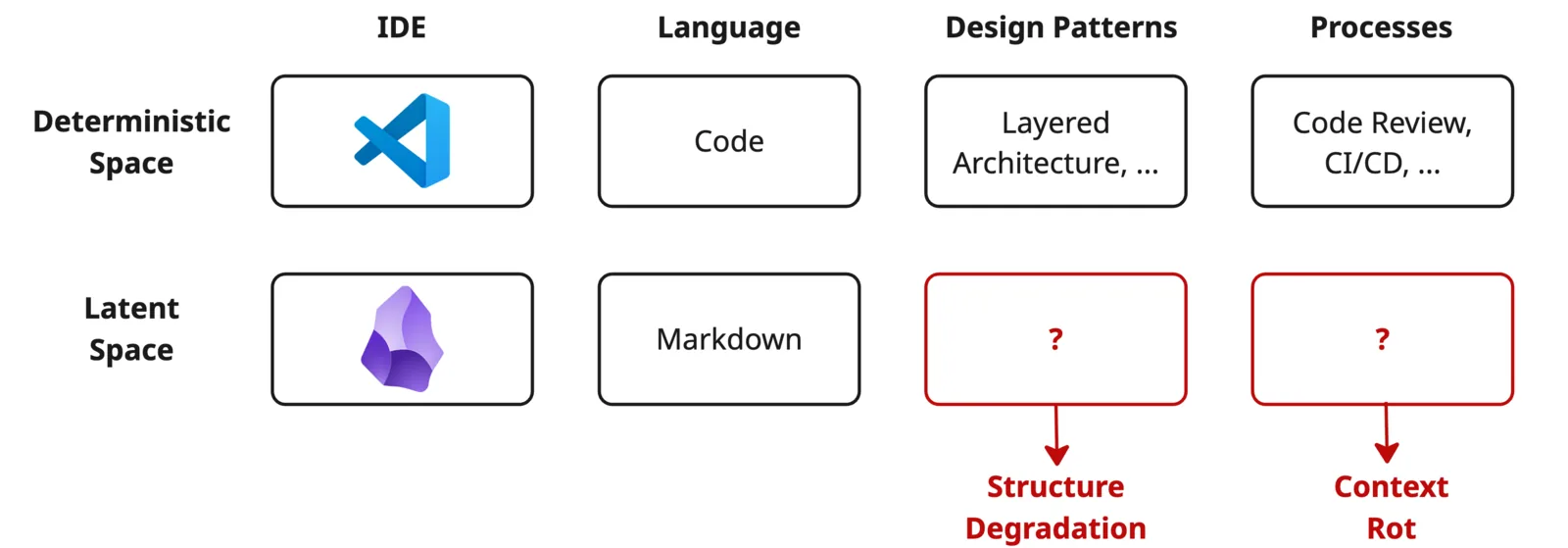
The deeper reason is that personal knowledge management operates in latent space, as opposed to the deterministic space of code.
Markdown is actually code now. The compiler is LLM.Garry Tan, YC
In the deterministic space there are compilers, tests and code review. In latent space there are currently no well-defined review processes and no design patterns, so a vault accumulates context rot and its structure degrades (Fig. 2). Building a second brain is latent space engineering, and doing it well needs the same kind of discipline that code already has.
# Components
Graphkasten defines three things:
- A design pattern, which specifies how to design and structure notes and the content of the vault.
- A review process, which explains how new notes get created and indexed in a maintainable fashion.
- Insights, which covers getting something back out of the second brain, using Obsidian tools like Graph View, Bases and tag folders.
# Design pattern
The design pattern rests on four primitives:
- Folders define the structure, using the LIFT system described below.
- Links create the meaningful edges of the graph.
- Tags define areas of interest and highlight the graph.
- Frontmatter provides the metadata that Obsidian Bases query.
# Folders
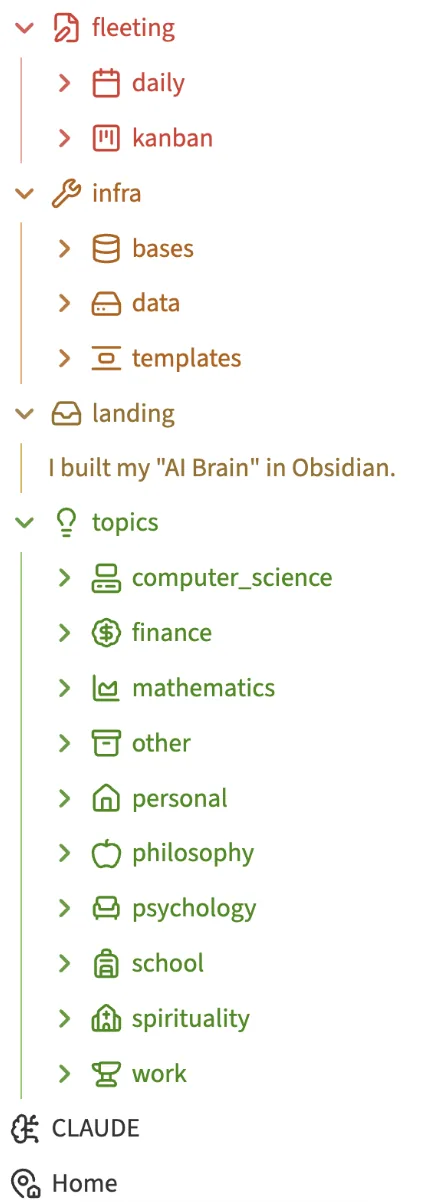
The vault uses the LIFT system, which splits it into four folders (Fig. 3):
- Landing: where all notes land before being sorted into the other three.
- Infra: Obsidian plugins, scripts and data files, such as bases, templates and attachments like PDFs, video and audio.
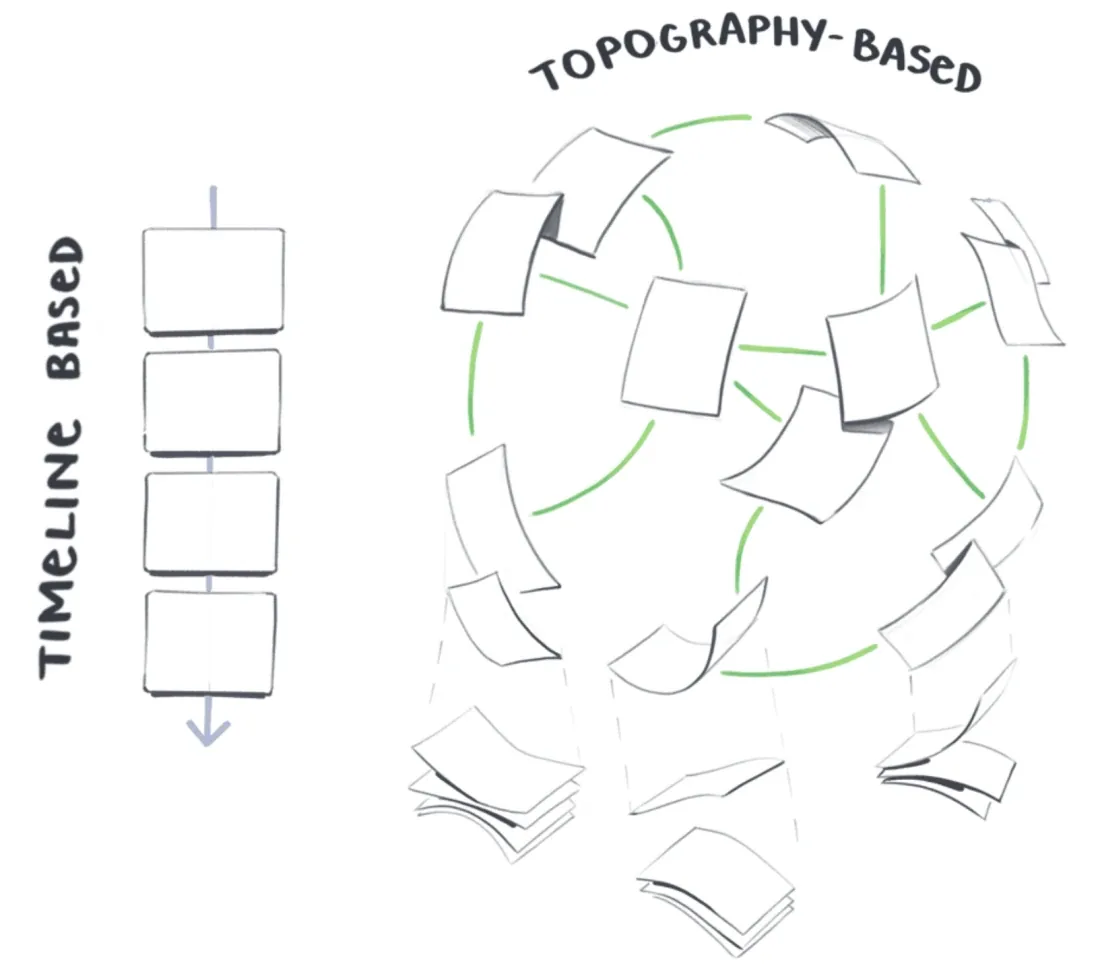
- Fleeting: timeline-based notes such as daily notes, kanban notes, scratchpads and AI conversations. These are deliberately kept out of the graph view, because they are defined by when they happened.
- Topics: all the areas of interest, and the only folder displayed in the global graph, because those notes are defined by their topography rather than their date. Topic folders can nest as deeply as the subject demands: finances, knowledge management, computer science, health.
That timeline-versus-topography split is the load-bearing distinction of the whole folder system, and it is the reason the graph stays readable as the vault grows (Fig. 4).
# Links
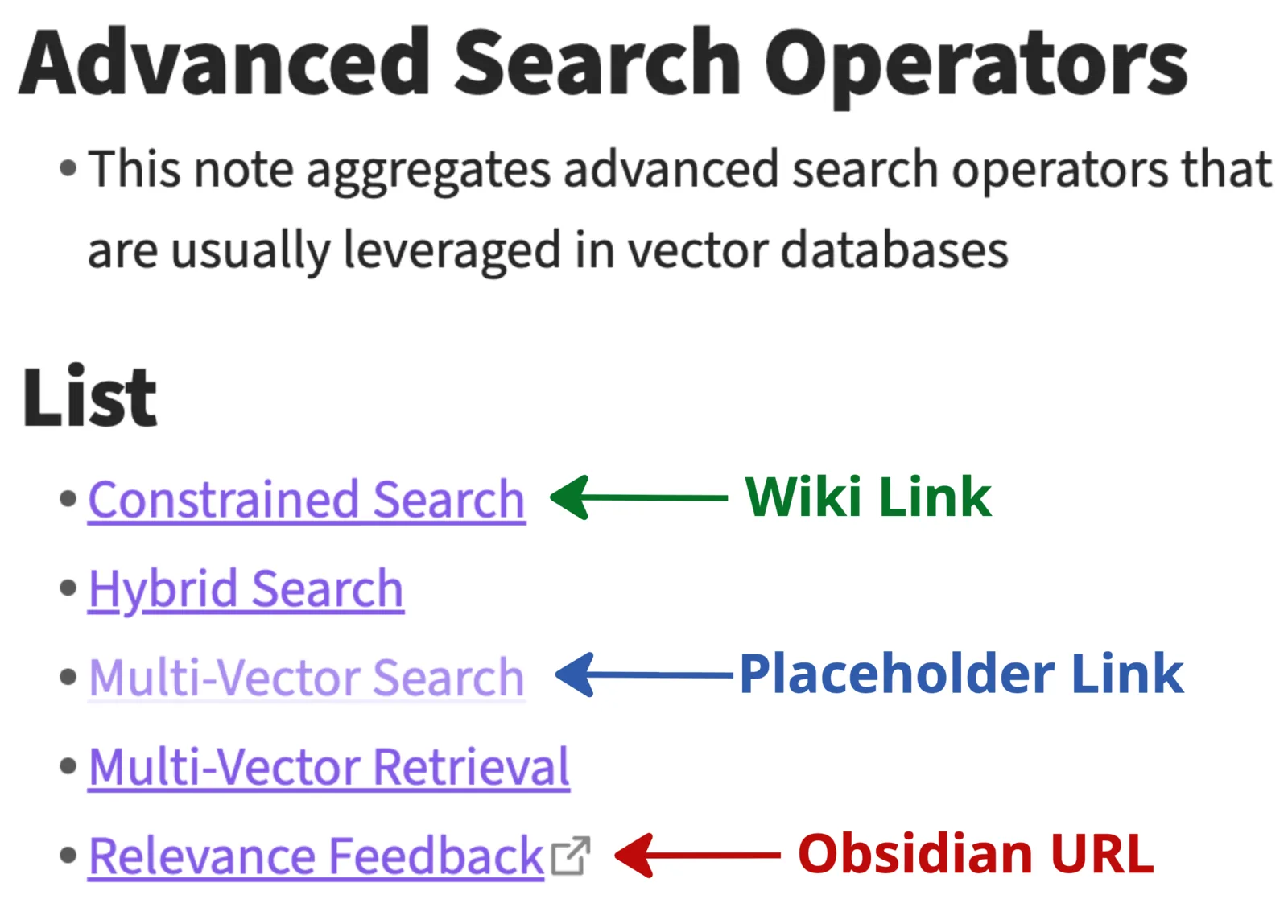
Links are the most important object in Graphkasten, because they are what the graph is actually made of. The goal is to create links that are insightful and meaningful to your own mind, and the thing to avoid is over-linking, which pollutes the graph until it stops telling you anything. You can still connect nearly everything: use Obsidian URLs for the connections that are not important, since they let you click through without adding an edge. A good starting point is to mirror the natural hierarchy of the notes, the one already expressed in the folder tree, and then bend the links as your thinking about the material changes.
There are three link types, and the choice between them is the whole discipline (Fig. 5):
- Wiki links,
[[Note Title]], are resolved edges in the graph. - Placeholder links,
[[Not Yet Written]], are unresolved stubs that render red in the graph and read as a TODO. - Obsidian URLs,
obsidian://open?vault=…&file=…, are click-throughs with no graph edge at all.
# Tags
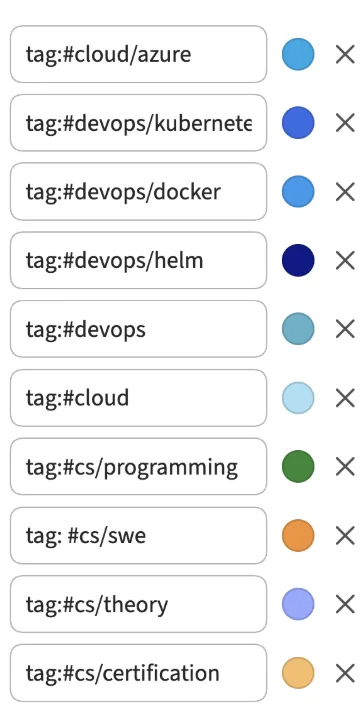
Tags define the topics in your vault. Unlike folders, they are deliberately shallow in Graphkasten: only one level of nesting is allowed. Each tag is associated with a colour, and that colour is what highlights its notes in the graph view, which turns a tagging decision into something you can see rather than something you have to remember (Fig. 6).
# Frontmatter
Frontmatter is queryable metadata that Bases, agents and templates all read. Field names should be unified across the vault, and Obsidian templates are the practical way to keep them that way, one template per note type. The minimal shape is:
| |
# Review process
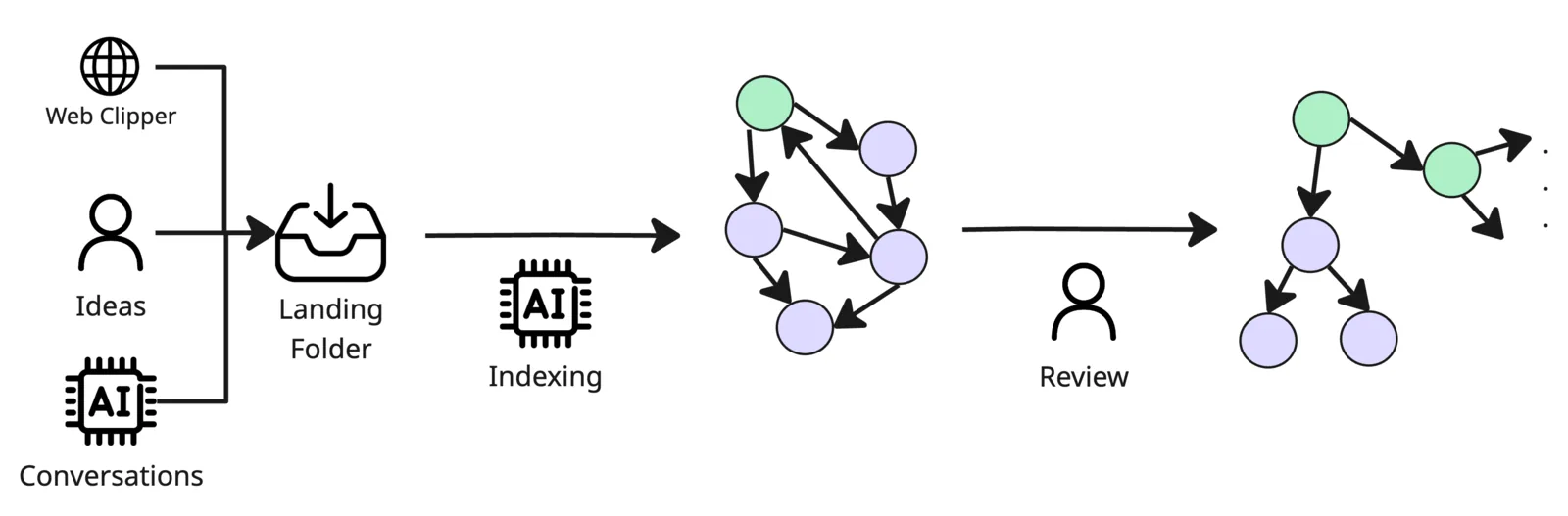
The review process is inspired by medallion architecture: every note flows through the same stages, getting more structured at each one (Fig. 7).
- Inbox: new and clipped notes drop into
landing/, which is gitignored and carries no links and no tags. - AI indexing: an agent reads the note, writes its frontmatter, files it under
topics/<cluster>/, and links it from that cluster’s MOC. - Graph view: the note shows up as a new node coloured by its tag, and a misplaced note stands out immediately, which is the point.
- Human review: you scan the graph, fix wrong edges, promote placeholder links and tighten tags.
- Stable node: what comes out the other side is reachable, correctly tagged, and safe for the next agent to cite.
# Insights extraction
# Global and local graph view
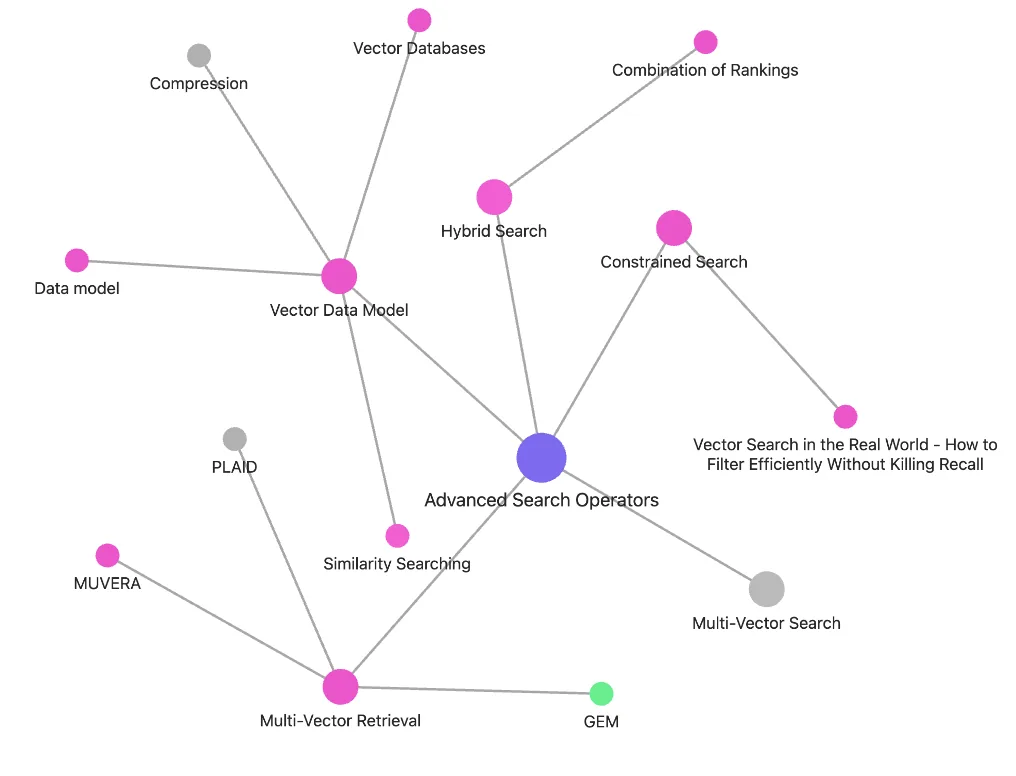
The global graph is both the map and the way you travel it. Colour groups defined at the tag level turn it into a picture of your topics of interest, so you locate material by steering toward the cluster it belongs to, and a note sitting in the wrong colour is visible immediately. That is what also makes it the audit surface after AI indexing, the place where a badly filed note is obvious. The local graph shows a single note’s neighbourhood at a chosen link depth (Fig. 8). For the depth, filter and colour-group syntax behind both, see the Obsidian Graph view documentation.
# Bases
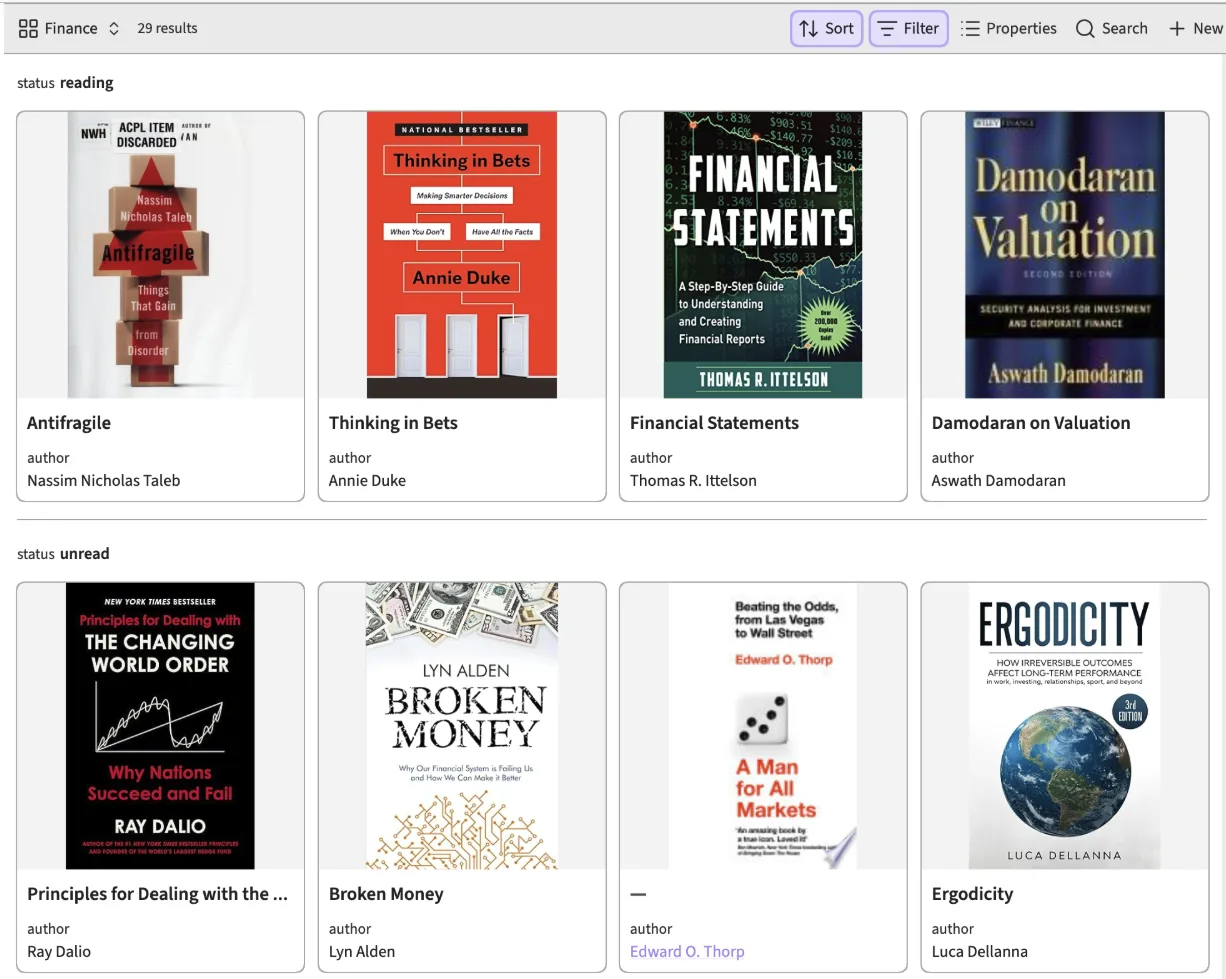
Obsidian Bases turn any folder or tag query into a live table, card or kanban view driven by frontmatter. You can slice notes by any field: a reading list by status, papers by citation count, tasks by priority. This complements the graph rather than duplicating it, since the graph shows structure and bases show attributes (Fig. 9). Real examples live in infra/bases/, such as Book View.base, Kanban.base and Public Notes - Table.base.
# Tag view
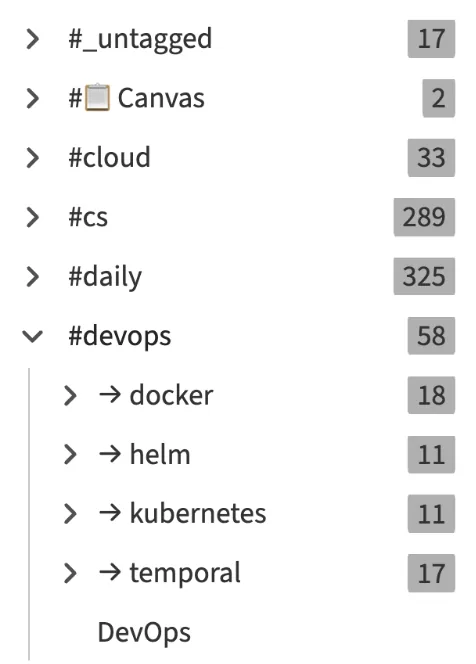
Obsidian’s dedicated tag panel lets you browse the vault by tag hierarchy rather than by folder (Fig. 10). Because colour groups are defined once at the tag level, the same decision that organises this panel is what creates the natural clusters you see in the graph view.
# Conclusion
Graphkasten treats the graph as the primary artifact: folders, tags, links and frontmatter all exist to shape it. LIFT keeps AI-generated noise out of the graph, and the review pipeline keeps the structure from rotting. Bases and the tag panel turn the same notes into query-driven views without duplicating any data. The result is a second brain that stays legible as it grows, and stays cite-able for the next agent that opens it.
# References
- Graphkasten example vault, an Obsidian vault implementing this specification
- Zettelkasten, the method of Niklas Luhmann
- PARA by Tiago Forte
- CODE / Building a Second Brain overview by Tiago Forte
- LLM Wiki by Andrej Karpathy
- How the Open Knowledge Format can improve data sharing by Google
- A Brief History & Ethos of the Digital Garden by Maggie Appleton
- Graph view documentation by Obsidian
- Bases documentation by Obsidian